


RC-AUTH
Account management using ID/PW is broken

Common user situations
- ・Average of 14 accounts per person
- ・ID is a string or email address assigned by each service
- ・(Payment) It's hard to remember or (email addresses) have to be reused
- ・Account information leaked from a service with poor email address management
It is no longer possible for ordinary end users to manage it.
Service Features
-

No need to manage ID/PW
You can easily authenticate and log in without an ID/password using an "authentication universal key" on your smartphone or other device.
-

Two-way authentication : user
authentication + service authenticationThis can prevent "spoofing" such as fake services.
-

No special apps are required on the
deviceThe authentication function is performed by the authentication universal key on hand, so the service can be used on any type of device without any special settings.
-

Supports biometric authentication such as fingerprint authentication
It can also be easily combined with various biometric authentication functions, such as fingerprint authentication functions found on smartphones.
Authentication and login are easy using the "Authentication Universal Key"
-
Authentication using RC-Auth instead of normal ID/PW authentication
-
Enter the unique PIN code displayed on the screen into your Universal Key compatible app.
-
If authentication is successful, you will automatically be redirected to the login screen.
-
Disposable authentication tickets are automatically exchanged in the background, and authentication is performed between the user and the service.
The authentication universal key reports "which service you logged in to and as which user." You can log in without entering any important information such as your ID/PW, so you can log in safely even when you're away from home, such as at an internet cafe.
Can be integrated into existing apps
We can also develop OEM smartphone apps specifically for your company, or add and integrate the authentication Universal Key™ function into your existing apps.
RC-Auth authentication is easy to set up
-
STEP01
For services that support authentication using RC-Auth, all a user needs to do to use it is to register the authentication universal key issued by the service on a compatible app on their iPhone or Android device.
-
STEP02
When registering a new user for a service that supports authentication using RC-Auth, or while logged in to the service, click the "Create Authentication Key" button on the "Account Information Management Screen." This will display a screen for entering a PIN code.
-
STEP03
Open the "Add Authentication Key" screen in an app that supports the authentication universal key on your device, such as an iPhone or Android.
-
STEP04
Enter the PIN (sPIN) displayed on the screen of your authentication universal key compatible app into the PIN code entry screen on the service side (this is all the user needs to do).
-
STEP05
After that, key information and other data will be automatically exchanged between the service and the authentication universal key-compatible app in the background, and you will be ready to use authentication using RC-Auth.
*If you incorporate an authentication function using RC-Auth into a dedicated app for your company's service, you can omit the above preparation steps and configure it so that registration is performed automatically through background processing.
Difference between ROUTE CODE and OTP (One-Time Password)
- ・User registration is difficult
- ・Distribution costs are high
- ・It's a hassle to have to purchase more devices for each service.
- ・・Cannot deal with phishing scams
- ・It's troublesome in the first place
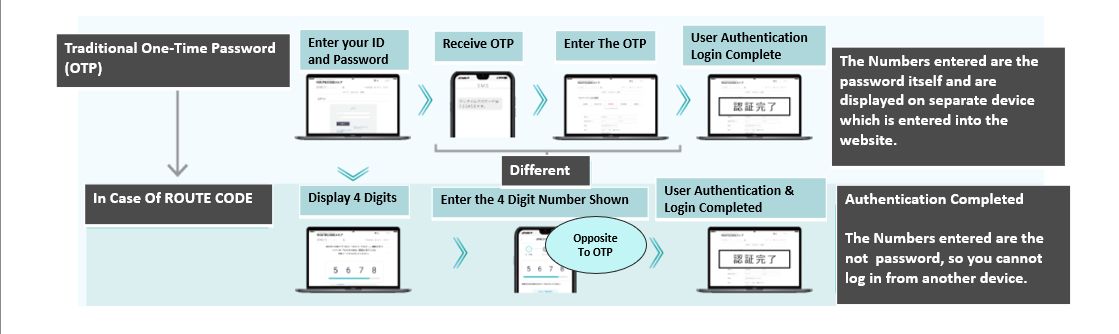
Benefits of implementation
Service Provider
- ・Providing more secure login options
- ・Providing a means of user registration without an email address
- ・Use of push notifications and messaging functions for each user's app
Dear User,
- ・Free from ID/PW management
- ・Safe login even from a PC on the go, such as in an internet cafe
- ・Preventing phishing scams
- ・Certification history management
- ・Easy and secure centralized management of accounts for various services
FAQ
- What are apps that support authentication using RC-Auth?
- This app creates, saves, and executes authentication keys used for authentication with each service. NuID authentication functionality may be incorporated into each company's own app, including apps that support the authentication universal key for authentication using RC-Auth. Please check the information for each service.
- Can RC-Auth authentication be used in conjunction with other authentication methods?
- Yes, you can. While continuing to use the traditional ID/PW authentication, you can also provide authentication using RC-Auth, allowing users to choose which method they want to use depending on the situation.
- What should I do if I lose the smartphone on which the "authentication key" is saved?
- It is also possible to take backup measures such as creating a "spare key" on another device in advance. As with password reminders, whether or not to provide a means to reissue an "authentication key" is at the discretion of each service.
A new authentication service that uses a unique
"Authentication Universal Key"
No ID/PW is required, and with simple operation, just enter a 4-digit number as you look at it, and
secure login and authentication is realized with automatic two-way authentication using your smartphone as a key.
It combines security that strongly prevents spoofing with simple operation. It
can also be used in conjunction with existing authentication systems, making it easy to implement.